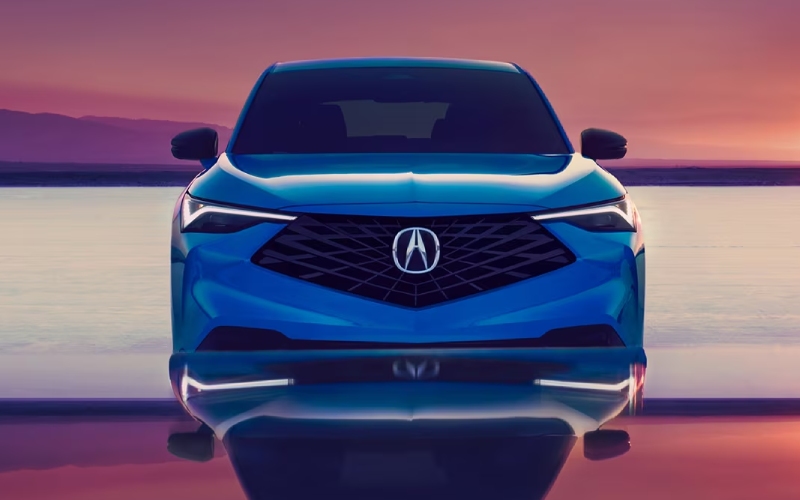
Acura of Milford - What does Google built-in add to the 2026 Acura ADX for Cheshire, CT drivers?
Google built-in transforms the cabin tech of the 2026 Acura ADX from helpful to truly seamless, and that matters when your everyday driving takes you across Cheshire, CT for work, errands, and weekend plans. Native Google Assistant voice control, continuously updated Google Maps, and access to in-vehicle apps through Google Play bring the services many drivers already use on their phones directly into the ADX interface — with no cables and no extra steps.
Because these tools live in the vehicle, voice commands feel faster and more natural, and directions stay current even as traffic patterns shift. When you add standard wireless Apple CarPlay® and Android Auto™ compatibility into the mix, plus Wi-Fi Hotspot Capability and AcuraLink® connected services, the ADX becomes a confident co-pilot for daily life around New Haven County.
What Google built-in means day to day
With Google built-in available on select ADX trims, you can say, “Hey Google” to place calls, send messages, set reminders, or adjust cabin settings. Google Maps integrates lane guidance and live traffic, which is especially helpful when you are transitioning between local roads and highway ramps. And when you are parked, apps via Google Play provide additional entertainment options right on the 9-inch HD touchscreen.
The practical upside is simple: less time fiddling with your phone, and more time keeping your focus where it belongs — on the drive. It is a natural match for the ADX’s polished driving dynamics and the way Acura engineers are integrating intuitive tech across the lineup.
Key connectivity highlights to look for
- Native voice control that feels natural and quick
- Navigation that updates traffic and lane guidance continuously
- App access when parked for video, casual games, and web browsing
- Wireless Apple CarPlay and Android Auto standard across trims
- Available 15-speaker Bang & Olufsen® audio for immersive sound
These features come together to make your routine easier. Picture finishing a call, asking for the closest parking near your destination, then checking an upcoming calendar reminder — all with your hands on the wheel and eyes ahead.
Tips to get the most from Google built-in
Maximizing Google built-in is less about setup and more about learning a few power moves. You can tailor home and work addresses in Google Maps for one-tap routing, create a shortlist of favorite destinations, and use voice commands to jump between them. Assign a few common climate and audio requests to voice prompts so you can tweak comfort and entertainment without taking your attention from the road.
- Save frequent places to favorites for faster routing
- Use voice commands for cabin temperature and fan speed
- Check alternative routes when traffic builds ahead
- Pair wireless CarPlay or Android Auto for your preferred phone apps
- Enable Wi-Fi hotspot to keep passengers connected
For audio, the available 15-speaker Bang & Olufsen® system turns podcasts and playlists into a rich soundstage. Combine that with Active Noise Cancellation™ and the ADX’s quiet, well-insulated cabin, and you have a tech-forward space that also feels premium.
How this tech complements the ADX driving experience
The 1.5L VTEC® Turbo delivers smooth torque for confident passing, and the Integrated Dynamics System lets you toggle between Normal, Comfort, Sport, and Snow modes. Google built-in layers onto this by streamlining your tasks and navigation, so the polished mechanicals of the ADX are always front and center. Available All-Wheel Drive with Intelligent Control System adds confidence in changing conditions, while AcuraWatch™ driver-assist technologies help enhance awareness every mile.
What stands out most is how the ADX’s tech feels cohesive rather than tacked on. The 10.2-inch digital instrument cluster and center display are crisp and easy to read, and the interface prioritizes quick, logical access to commonly used functions. It’s a natural evolution of Acura’s driver-centric philosophy.
Frequently Asked Questions:
Do I need my phone connected for Google built-in to work?
No. Google built-in runs natively in the vehicle, so Google Assistant and Google Maps function without a phone connection. You can still connect your phone wirelessly for Apple CarPlay® or Android Auto™ if you prefer.
Can I still use Apple CarPlay or Android Auto if I have Google built-in?
Yes. Wireless Apple CarPlay® and Android Auto™ are standard across ADX trims. Google built-in is an additional option on select models that complements, not replaces, phone projection.
Does Google built-in include a data plan?
On equipped trims, Google built-in includes data for in-vehicle apps for a defined period. For details and availability, review the package content on the ADX trim you are considering.
What if I prefer to keep things simple?
You can use the standard touchscreen with wireless Apple CarPlay® or Android Auto™ and keep voice commands minimal. The ADX is designed to be intuitive whether you want advanced features or a streamlined setup.
From the first drive, you will notice how the technology helps you focus. Voice commands that feel natural, maps that anticipate turns, and a clean interface for your daily apps — it all adds up to a calmer, more capable commute around Cheshire, CT.
If you would like a walk-through of Google built-in alongside a test drive, our team can set up a quick demo and show you how everything works together with AcuraWatch™ safety features, the Integrated Dynamics System, and available All-Wheel Drive. You will come away knowing exactly which package best fits your needs.
We are proud to be Acura of Milford, serving Bethany, Cheshire, and Hamden with knowledgeable guidance, convenient appointments, and a relaxed, helpful approach to choosing the right ADX for your lifestyle.